



Meta Verified भएर पनि किन सुरक्षित भइएन?
सामाजिक सञ्जालमा आफ्नो पहिचान सुरक्षित राख्नका लागि मैले Meta Verified खरिद गरेको थिएँ। मेरो सोच थियो—यदि मैले Meta लाई प्रत्येक महिना शुल्क तिरिरहेको छु भने कम्तीमा मेरो Account, मेरो Identity र मैले चार वर्ष लगाएर बनाएको Page सुरक्षित हुनेछ।
तर मेरो अनुभवले बिल्कुलै फरक कथा सुनायो।
आज यो लेख कुनै अफवाह, अनुमान वा अरूको कथा होइन।
यो मेरो आफ्नै अनुभव हो।
यस लेखमा उल्लेख गरिएका घटनाहरू सम्बन्धित Login History, Account Activity र अन्य प्रमाणहरूबाट पुष्टि गर्न सकिन्छ।
Everything Started Normally
May 5 को दिन सबै कुरा सामान्य थियो।
म नेपालमै थिएँ।
मैले कुनै VPN प्रयोग गरेको थिइनँ।
मेरो Facebook Account सामान्य रूपमा प्रयोग भइरहेको थियो।
तर केही समयपछि मैले Login Activity हेर्दा एउटा अचम्मको कुरा देखेँ।
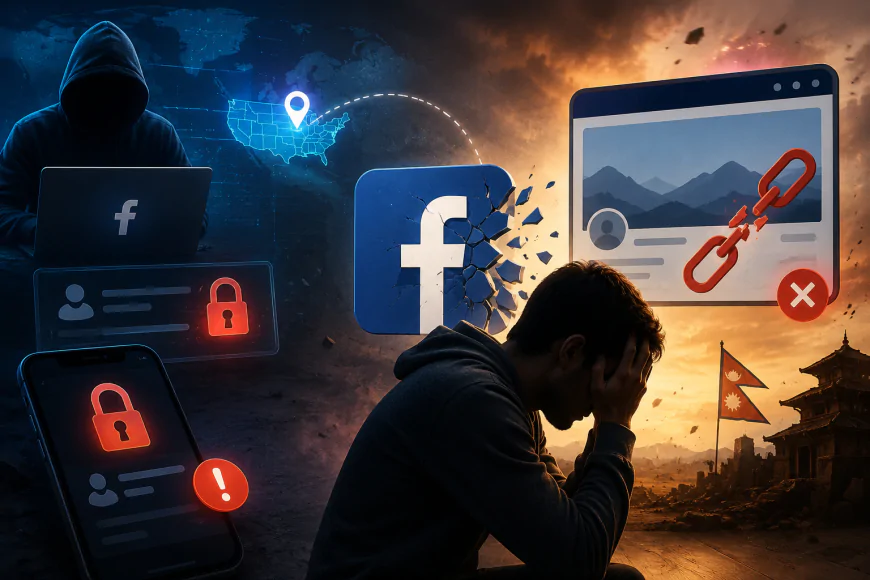
मेरो Account मा United States बाट Login भएको देखाइरहेको थियो।
त्यो Login मैले गरेको थिएन।
म नेपालमै थिएँ।
मेरो यात्रा इतिहास, मेरो Device, मेरो Internet Provider सबैले त्यही कुरा प्रमाणित गर्छ।
A Login From Another Country

Imagine opening your security settings and seeing that your account was accessed from another continent.
That was exactly what happened.
According to Facebook's own activity log, there was a login from the United States while I was physically present in Nepal.
This immediately raised serious questions.
If Meta's security system detected a login from another country, why wasn't the session blocked?
Why wasn't stronger verification requested?
Why was the session allowed?
These are questions I still cannot answer.
त्यसपछि सबै कुरा केही घण्टामै परिवर्तन भयो
अमेरिकाबाट Login देखिएको केही समयपछि मेरो Personal Facebook Account Disable भयो।
कारण?
Meta ले Community Standards उल्लङ्घन गरेको भन्दै मेरो Account बन्द गरिदियो।
तर वास्तविकता के थियो?
मैले त्यो Account बाट कुनै Post गरेको थिएन।
कुनै Photo Upload गरेको थिएन।
Profile Picture समेत परिवर्तन गरेको थिएन।
त्यसैले Community Standards उल्लङ्घन गरेको भन्ने निर्णय मेरो लागि पूर्ण रूपमा अप्रत्याशित थियो।
Losing My Personal Account Meant Losing Everything
Most creators manage Pages using a personal Facebook account.
That was also my setup.
The disabled account was the administrator of my Facebook Pages and Business Manager.
Once that account disappeared, everything connected to it became vulnerable.
Business Manager Takeover

The situation became even worse.
After my account was disabled, someone I did not authorize joined my Business Manager.
I noticed unfamiliar access inside the Business Manager.
My Pages were unpublished.
Deletion schedules were created.
Administrative changes appeared that I never performed.
Those actions were not made by me.
I still had no access.
Four Years of Hard Work
A Facebook Page is not just another social media profile.
It represents years of work.
Years of publishing.
Years of building trust.
Years of audience growth.
Years of consistency.
Mine represented nearly four years of continuous effort.
Within a very short period, everything disappeared.
No creator wants to experience that.
Contacting Meta Support
Because I was a Meta Verified subscriber, I expected customer support to investigate the issue carefully.
I provided evidence.
I explained the suspicious login.
I explained that I was in Nepal.
I explained that my account suddenly became disabled.
I explained that unauthorized changes happened inside Business Manager.
I expected answers.
Instead, I mostly received template responses.
The outcome never restored what I had lost.
Paying for Verification Doesn't Always Mean Complete Protection
Many people believe Meta Verified guarantees security.
That was also my expectation.
However, based on my personal experience, paying for verification alone did not prevent:
• Suspicious Login
• Account Disablement
• Business Manager Takeover
• Page Unpublishing
• Scheduled Deletion
That does not necessarily mean Meta Verified has no value.
It provides several benefits.
But my experience shows that it should not be considered a complete security solution.
Lessons Every Creator Should Learn
This experience taught me several important lessons.
Always enable Two-Factor Authentication. ( Even though i had two-factor Authentication enabled)
Regularly review Business Manager access.
Download account backups.
Monitor login history.
Keep recovery information updated.
Never assume a paid subscription alone guarantees protection.
Why I Decided to Leave Facebook
After losing years of work, I asked myself one question.
Should I continue investing my time on a platform where I no longer feel confident about the safety of my work?
My answer was no.
This is a personal decision based on my own experience.
I chose to move my focus toward platforms and projects where I feel I have greater control over the content I create.
My Message to Meta
Creators invest years building communities.
Those communities deserve better protection.
When users provide evidence of suspicious logins, investigations should be transparent.
Support should explain what happened.
Creators deserve clear communication—not uncertainty.
Final Thoughts
Technology should empower creators, not make them fear losing years of work overnight.
My purpose in writing this article is not to discourage anyone from using Facebook.
Instead, I hope my experience encourages creators to strengthen their own security and reminds technology companies how important trust is.
Because sometimes losing a social media page isn't just losing followers.
Sometimes it means losing years of passion, memories, and hard work.
यो लेख कसैलाई दोष दिनका लागि लेखिएको होइन।
यो मेरो आफ्नै अनुभव हो, जसमा मैले देखेको Login Activity, Account Disable भएको समयक्रम, Business Manager मा भएका परिवर्तन तथा Meta Support सँग भएको सम्पर्कका आधारमा आफ्नो कथा प्रस्तुत गरेको छु।
यदि तपाईं पनि कुनै Page, Business वा Community निर्माण गर्दै हुनुहुन्छ भने एउटा कुरा सम्झनुहोस्—
सिर्फ Meta Verified हुनु नै पूर्ण सुरक्षा होइन।
सुरक्षा भनेको नियमित निगरानी, Two-Factor Authentication, Backup, Recovery Information र आफ्ना Digital Assets को जिम्मेवारी पनि हो।
यदि मेरो अनुभवबाट एउटा Creator ले पनि आफ्नो Account सुरक्षित राख्न सके भने यो लेख लेख्नुको उद्देश्य पूरा भएको ठान्नेछु।
धन्यवाद।